Metro Micro Test Ride
Did you know there's a public transit ridesharing service in The Valley? We try it out and provide the missing manual.

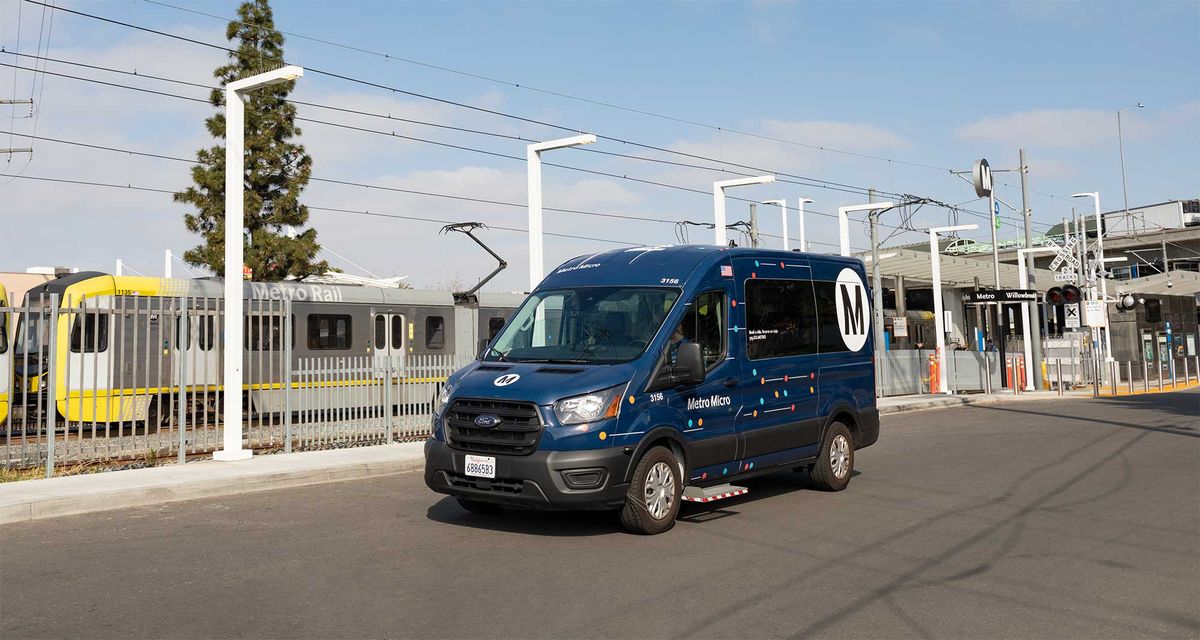
Metro Micro, the public transit answer to Uber that's only a buck or two, sounds amazing - especially with the ever-increasing cost of the big ridesharing apps. So why aren't more people using it? It can indeed be a useful and economical alternative. But it has some limitations and a bit of a learning curve. Here's what you need to know.
What is it?
Metro Micro is similar to rideshare services like Uber or Lyft (or taxis in olden times) in that you can use an app or phone call to book a van to come and pick you up to take you to the destination of your choice. You can either set a pick-up for now-ish or a future time or date. It's akin to the lower cost "shared" offerings on the big apps as the van may pick up and drop off other people too. The apps are linked on their website and available in the Google Play or iPhone App stores. Service is also available via a web app or by calling 323.GO.METRO.
Cost
Metro Micro is the same standard cost as the bus or rail lines - generally $2.50 but less with discounts or transfers. Just use your tap card in the van or enter a bank card in the app.
Service Locations
This is where limitations come in. Your pick-up and destination points must be within a service zone. So if you live in Chatsworth and are trying to get home after a Mai Tai or two at the Can Tiki, that's not going to work. Each of those locations actually are in the two Valley zones served by Metro Micro, but they are two different zones as shown below.
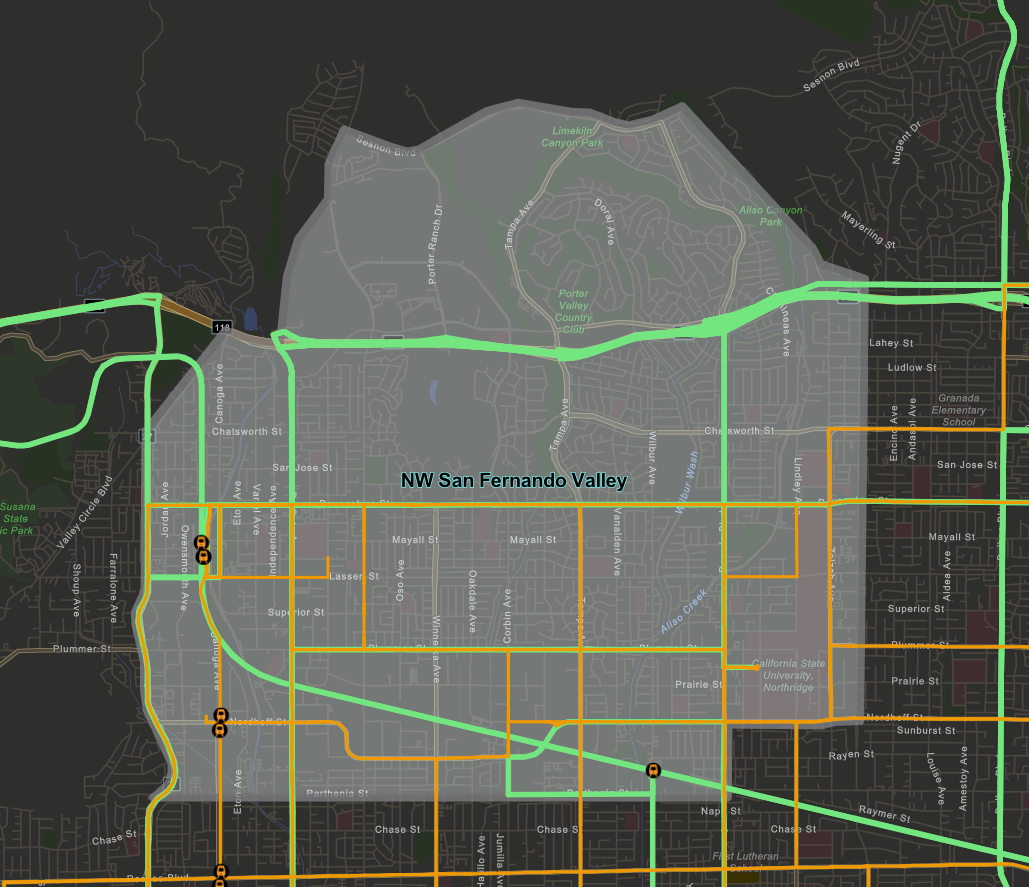
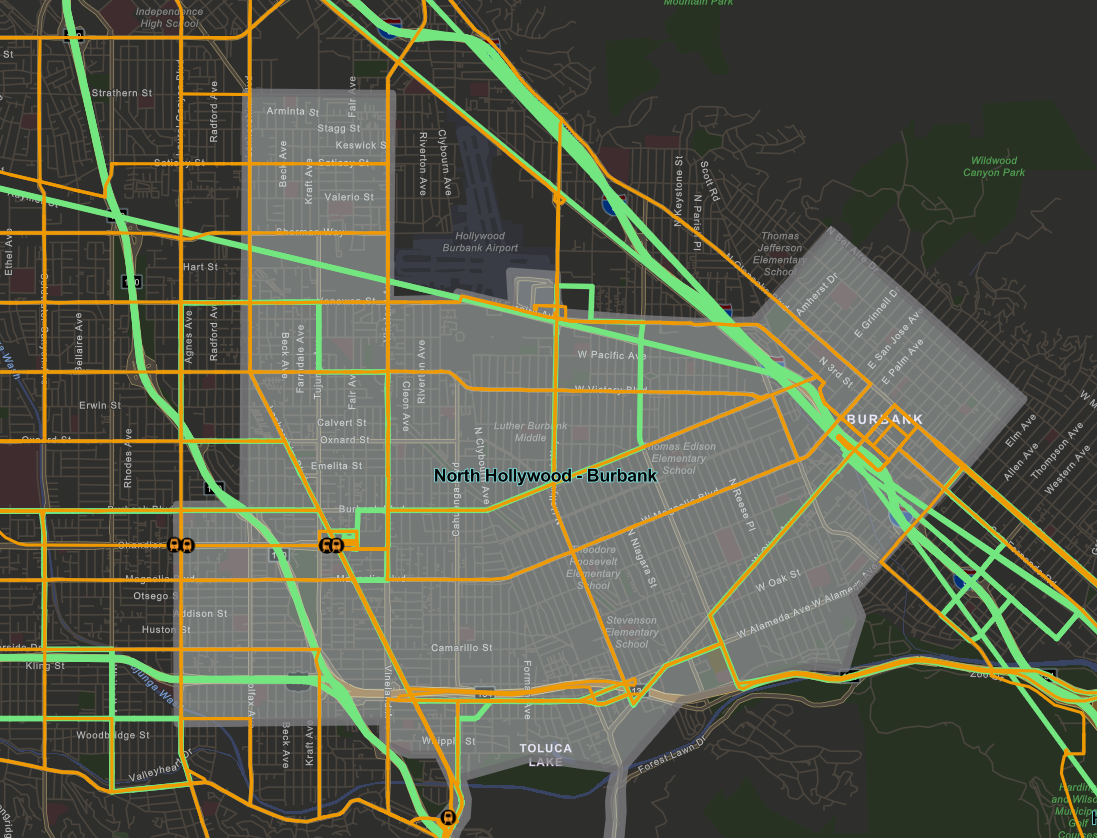
However, if you need a ride home to the Burbank 'burbs from the Can Tiki, you're in luck. Note that the van only does pick-ups and drop-offs at transit stops or major intersections, not a specific business or house. The precise locations are based on your pick-up and destination and shown in the app when booking a ride, but are often just a short walk.
Service Hours
The service starts between 5-10am depending on the day and zone and ends at 10pm in the Valley. Not a problem for many trips, but it a bit early for a night out.
The App
The app has similarities with ridesharing apps you may know, but the user experience can be confusing due to its unique limitations as well as Metro's positioning of the service.
To use the app, you have to set up an account before booking a ride. Once you're set up, the app opens with a map and a field to enter your destination. This is fairly straightforward and similar to the big tech apps.
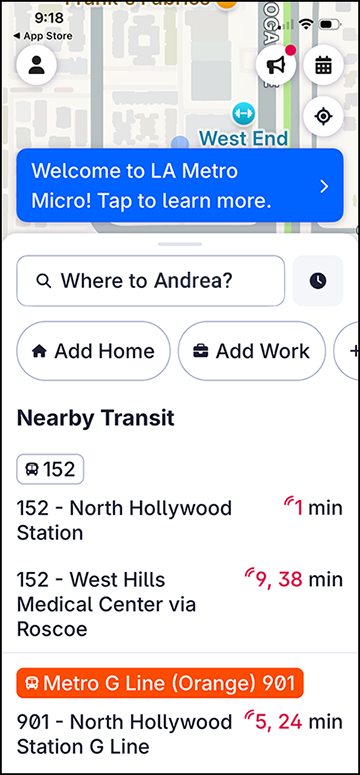
Other features:
- click on the clock icon to specify a booking time for next available or future leave or arrival times
- service zones are marked with heavy blue outlines and dotted lines show you where you need to walk for pick-ups and drop-offs
- search includes destination names, so you don't have to look up the address separately (though you also get results far beyond LA)
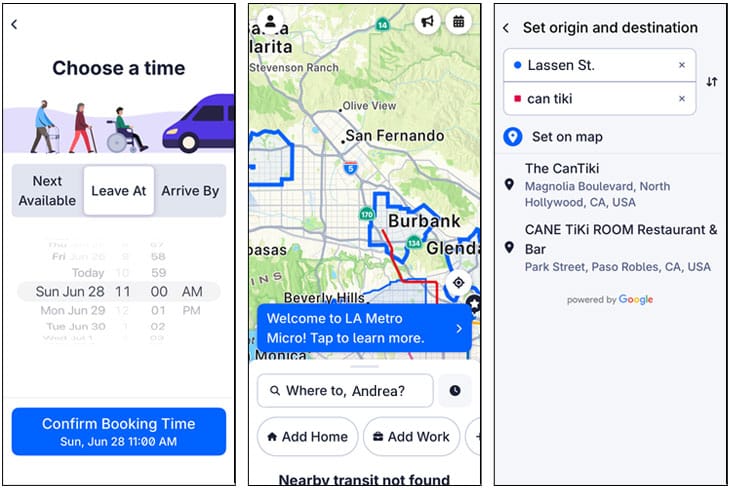
You might have noticed in that first booking screen that there are bus arrival times under "Nearby Transit", which seems odd if you're booking a van. This confusing juxtaposition happens throughout the app and warrants further examination.
So services like Uber and Lyft, which many people are familiar with, have no connection to public transit and their app is focused on a more straightforward pick-up request. Metro Micro on the other hand is described as supplementary, filling in gaps and providing first mile/last mile service to the rest of their system which is why transit info is so prominent. They also are nudging riders to their mass transit options. You can hear more about the product from the 3rd party software providers, Spare.
One way this logic manifests in the app is the lack of explicit messaging when Metro Micro is no longer running or if you are nowhere near a service zone. Getting you to your destination via any Metro service whenever you use the app seems to take priority. But it is admittedly confusing that you can use a Metro Micro app to plan a trip and end up not using the Metro Micro van at all. Adding to the complexity, there is a separate Metro app called "LA Metro - Official" with more general transit info, but it does not include Metro Micro as an option.
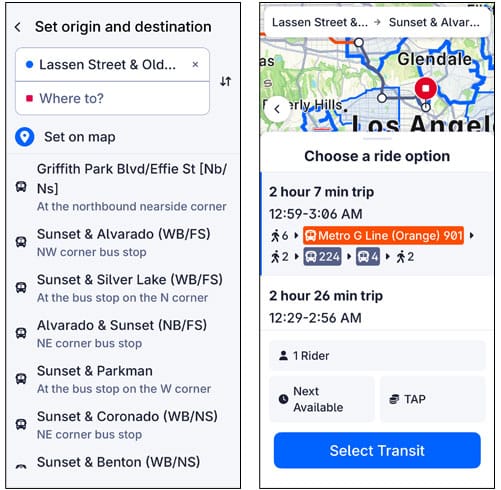
This all ends up making for a muddled experience. Is it a rideshare or not? And does it have the responsiveness and reliability to take riders to and from the bus? Or is it faster to walk? Is anyone using it as a supplement, or more of a replacement? If it's neither a rideshare nor mass transit, what exactly is it and when do you use it?
Program Criticism
The user experience, as often the case, may be a reflection of the conflicting forces around the service itself. Projects like Metro Micro, broadly referred to as microtransit, are often unpopular among public transit advocates. The biggest criticism is the cost, which can be up to 8 times that of mass transit per rider. And since it's much closer to a car than a train or bus, it similarly uses more energy and adds to traffic congestion. This lopsided cost/benefit ratio is perceived to exacerbate inequality while its users skew younger and more affluent. It's not hard to see both economic and social incentives to push its users towards mass transit offerings, even if the appeal of the service among its users is that it's not mass transit.
Also, a touted advantages over private sector companies was that it created union jobs for Metro workers. That also changed when Metro switched to a contractor to save costs (see Streetblogs LA again from 11/25/24).
That said, it still has its adopters who appreciate the added speed, convenience, economy and coverage of the service as well as an increased feeling of safety that's especially important to women riders.
How to get the most out of it
Issues aside, Metro Micro can be much less expensive than Uber and Lyft and can be a quicker or more convenient option in certain situations. Below are some tips for making sense of the Metro Micro app and how to use it for your needs.
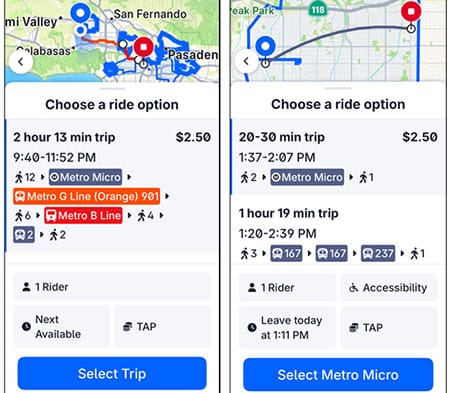
- Van service only: To use it only for the rideshare van, whether for an immediate or future pick-up, only book it within service hours. Also be sure to set your pick-up and drop-off locations within the same service zone (within a blue outline) and only choose a ride option with a Metro Micro van in it. The button for these trips are "Select Metro Micro".
- Van plus bus/rail: If you want to book a trip that uses a combination of transit lines with a Metro Micro van, you have more flexibility on the locations, though if you want first mile or last mile you should place those locations in the blue service zones accordingly. And the service hour limitation also applies. Whether the precise timing on all these transfers work in the real world is admittedly a question mark. There is sometimes a wait for Metro Micro. However, this seems to be the intended usage so perhaps there is leeway built in. The button for these hybrid trips is "Select Trip".
- Bus/rail trip planner: You can also use it for a Metro trip planner regardless of the Metro Micro rideshare service, in which case you can set pick-up and drop-off wherever and whenever you want and find the best route. The button for these trips is "Select Transit". Though note that there are other apps you can use for this. Along with "LA Metro - Official" there's also the Transit app or Google Maps with the transit setting. Metro transit data is publicly available for app developers and they may even crowdsource their own real-time data for more accurate status, so you can browse your favorite app store for which one you like best.
Who might find it useful...
- Anyone who lives in a service zone or frequently goes to a service zone that has a substantial distance to and from transit lines
- Anyone who has to take multiple transit lines due to route logistics (as opposed to distance) and wants a more direct ride within a service zone
- A teen under 16 going to the Northridge Mall or Burbank Town Center with their friends
- An elder or sight-limited person who doesn't want to drive at night
- A woman who doesn't want to wait a long-time at a bus stop by themselves at night or has safety concerns with other riders
Conclusion
As mentioned, Metro Micro can be great option for some riders. And however Metro is trying to position the service or what the future plans are, it can still be used as a low-cost rideshare service. If folks value such a service, increased usage can increase the chance the program continues and grows.
But Metro can better define what this service is and follow through with clearer messaging and service design. If this is a rideshare, make that the focus of the rideshare app. If it's more paratransit than microtransit, make that clear... target those that are looking to use mass transit but just need first/last mile and transition support and perhaps combine this with similar services like Access. Its current state is somewhat in-between which makes it difficult for potential riders to understand and use.
Have you used Metro Micro? What do you think of it? Share your experiences in the comments or by email. Also let us know if you have tips for making the most of public transit in The Valley.